

What Tutti Orchestra is
Tutti Orchestra is a virtual instrument: it receives MIDI notes and plays them with recorded samples. It comes with the DB Soft Orquesta bank (65 orchestral, piano and organ instruments), downloaded the first time you use it. It also plays any SoundFont (.sf2) or SFZ bank you have.
- A VST3 plugin for your DAW and a standalone application for Windows.
- 64 voices of polyphony, built-in reverb and transposition.
- Play it from a MIDI keyboard, with the mouse, or from the computer keyboard.
It is the same sound engine that Symphonic Orchestrator and NovelaSonora use, and all three share the downloaded bank.
Installing and first launch
Run the installer and choose one of three installation types: Full (the VST3, the application and the documentation), Plugin only or Custom. The VST3 goes to C:\Program Files\Common Files\VST3\. Restart your DAW, or rescan your plugins, and look for "Tutti Orchestra" among the instruments.
Download the sounds
The first time, press Download sounds at the top of the window. A thin gold bar and the status line show how it is going:
- "Looking for the sounds on db-soft.cloud…"
- "Downloading sounds: 120 / 510 MB"
- "Checking the download…"
- "Installing the sounds: 40 %"
- "Sounds installed."
- The download is about 510 MB, and the installation needs about 1.2 GB of free disk space. Once installed, the bank takes about 514 MB.
- It is installed in
%LOCALAPPDATA%\Tutti\Bancos\DB Soft Orquestaand doesn't need administrator rights. - The download keeps going even if you close the plugin window, and when it finishes the bank loads by itself, with the grand piano selected.
- While it downloads, the button reads Cancel download. Once the bank is installed it reads Download sounds again, which repairs the installation or fetches a new version.
A half-downloaded bank is never used: it is only installed if it arrives complete and passes the check.
The window
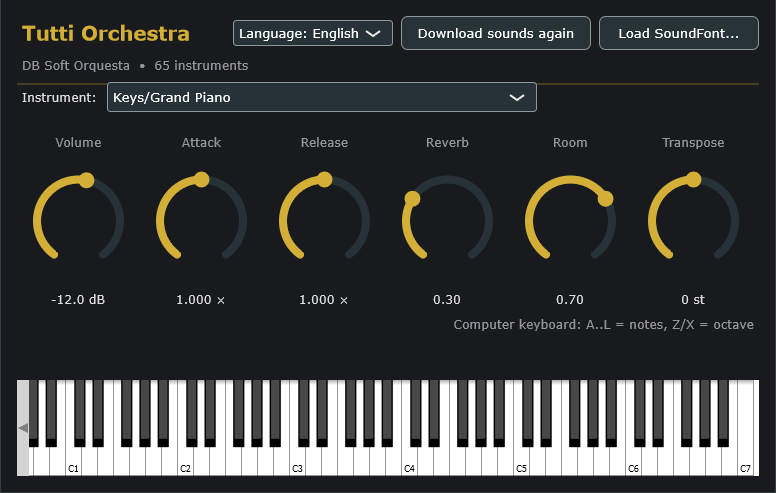
From top to bottom:
- Header: the language selector, Download sounds and Load SoundFont....
- Status line: the loaded bank and how many instruments it has, for example "DB Soft Orquesta • 65 instruments". With no bank, it asks you in red to download one.
- Instrument:: the instrument that plays. In the DB Soft bank the names go by section, such as "Strings/Violins Sustain" or "Keys/Grand Piano".
- The six knobs (table below). Drag to turn them, or type the value in the box underneath.
- The keyboard: play it with the mouse; it lights up the notes arriving over MIDI.
| Knob | Range | Default | What it does |
|---|---|---|---|
| Volume | −40 to +12 dB | −12 dB | The final volume. It starts low because samples tend to be loud: turn it up if you need to. |
| Attack | ×0.05 to ×4 | ×1 | Lengthens or shortens each sample's attack. It makes little difference on instruments with an instant attack. |
| Release | ×0.05 to ×8 | ×1 | Lengthens or shortens the tail when you let go of the key. |
| Reverb | 0 to 1 | 0.30 | How much space is added. Stereo output only. |
| Room | 0 to 1 | 0.70 | The size of the reverb room. |
| Transpose | −12 to +12 semitones | 0 | Shifts everything up or down, including notes already sounding. |
Language
The selector offers Language: automatic (Spanish if Windows is in Spanish, English otherwise), Idioma: Español and Language: English. It applies when you close and reopen the window, or restart the application. It is a setting of the computer, not of the session.
How to play it
- From a MIDI keyboard, connected to your DAW or, in the standalone application, chosen under Options. Tutti responds on all 16 channels.
- With the mouse, on the window's keyboard.
- From the computer keyboard, with the window in front. The keys in the table play notes at a fixed velocity.
| Keys | Notes |
|---|---|
| A S D F G H J K L | The white notes: C, D, E, F, G, A, B, C and D |
| W E T Y U O P | The black notes: C#, D#, F#, G#, A#, C# and D# |
| Z / X | One octave down / up |
A starts on middle C (MIDI note 60, which Cubase calls C3).
In your DAW
- One instrument per instance: for an orchestral template, load one Tutti instance per track.
- Program change: the DAW's program change chooses the instrument. In the DB Soft bank, program N is entry N of the list, counting from 0 (table under the bank). In a SoundFont, each preset's bank (CC0/CC32) and program are respected.
- Automation: all six knobs can be automated.
- The session saves the six knobs, the bank (its full path) and the selected instrument.
- What it responds to: pitch bend (±2 semitones), velocity (which also picks the sample layer) and the sustain pedal. The modulation wheel and aftertouch do nothing in Tutti.
Your own banks (.sf2 and .sfz)
Load SoundFont... opens the file chooser.
- A .sf2 is loaded whole.
- A .sfz loads the whole folder it is in, subfolders included: each
.sfzbecomes an instrument in the list, and the one you opened stays selected. That way you get every instrument in a bank even if you open just one. Be careful about opening a single .sfz in a huge folder: every .sfz under it is read. - In SFZ banks, each instrument's samples are read the first time you choose it, so the first switch to an instrument takes a moment.
- If a bank can't be loaded, the message says why, and the previous bank stays loaded.
What is supported
| Format | What is read |
|---|---|
| SF2 | Key and velocity ranges, loops, volume envelope, attenuation, pan, tuning and exclusive classes. |
| SFZ | WAV, AIFF or FLAC samples, key and velocity ranges (velocity layers), tuning, volume, pan, envelope, sample start and end, loops, #define and #include. |
| Not supported | Round robin (the first sample plays), release samples, keyswitches (the first articulation plays), overlapping layers (one region plays per note) and controller conditions. |
In SFZ banks only, a note up to an octave outside the instrument's range plays with the edge sample, transposed.
The DB Soft Orquesta bank
65 instruments made with samples by Versilian Studios (VSCO 2 Community Edition and the Versilian Community Sample Library), released into the public domain (CC0 1.0). You can use them in commercial and non-commercial music without asking permission or giving credit. DB Soft converted the samples to FLAC, gave each instrument its own .sfz and gathered the percussion into a kit.
| Programs | Section | Instruments |
|---|---|---|
| 0–12 | Brass | Horns (normal, Muted, Staccato), Trombone (normal, Staccato, Vibrato), Trumpet (normal, Harmon Mute, Staccato, Straight Mute, Vibrato), Tuba (normal, Staccato) |
| 13–16 | Keys | Grand Piano (13, the default), Organ Soft, Pipe Organ, Upright Piano |
| 17–23 | Percussion | Glockenspiel, Marimba, Orchestral Kit, Timpani Rolls, Timpani, Tubular Bells, Xylophone |
| 24–50 | Strings | Basses, Cellos, Violas and Violins (Pizzicato, Spiccato, Sustain, Sustain Soft, Tremolo; the basses also Non Vibrato), Harp (35) and Solo Violin (normal, Pizzicato, Soft, Spiccato, Tremolo) |
| 51–64 | Woodwinds | Bassoon (normal, Staccato, Vibrato), Clarinet (normal, Staccato), Flute (normal, Expressive, Non Vibrato, Staccato), Oboe (normal, Non Vibrato, Staccato), Piccolo (normal, Staccato) |
The list is in alphabetical order, as in the window's drop-down. The strings are sections; "Solo Violin" is the solo violin.
The percussion kit (Percussion/Orchestral Kit)
| MIDI notes | Sound |
|---|---|
| 36–37 | Bass drum (soft and loud) |
| 38–40 | Snare, snare roll, snare other hand |
| 41–45 | Suspended cymbal (rolls), bowed cymbal, clash cymbals |
| 49–51 | Tom (rim, hit, loud hit) |
| 52–54, 62–66 | Hi-hat (open, opening and closing, closed, pedal) |
| 55–58 | Triangle |
| 59–60 | Cymbal with stick, loud suspended cymbal |
| 67–69 | Gong (hit and scraped) |
Notes follow MIDI numbering with C4 = 60. In Cubase, subtract one octave from the note name.
Messages and common problems
| Message | What to do |
|---|---|
| "Can't connect to db-soft.cloud" | Check your internet connection and press "Download sounds" again. |
| "Not enough disk space" | Free about 1.2 GB on the system drive. |
| "The download was interrupted" or "arrived damaged" | Press "Download sounds" again: it starts over and checks again. |
| "No sounds: press Download sounds" | No bank is loaded: download it, or load a .sf2 or .sfz of your own. |
| "The folder has no .sfz files" | The folder of the .sfz you chose has no instruments: choose one of the bank's .sfz files. |
It sounds very quiet
The volume starts at −12 dB on purpose. Turn it up with the Volume knob.
There is no reverb
The reverb only works with stereo output. If the DAW track is mono, switch it to stereo.
Uninstalling
Use Windows Settings › Apps. The downloaded bank stays in %LOCALAPPDATA%\Tutti\Bancos, because the other DB Soft plugins share it: delete it by hand if you no longer want it.